![FlatFrog_logo.svg]](https://help.flatfrog.com/hubfs/FlatFrog_logo.svg)
How to Unbox and Connect Your Dell 55-inch, 75-inch and 86-inch?
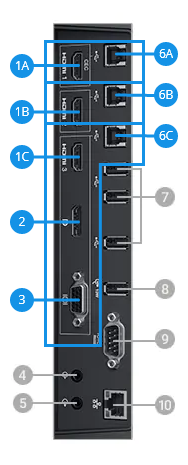
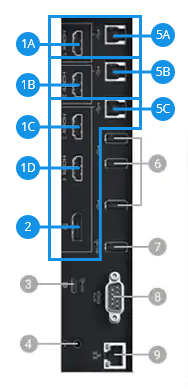
Connect your computer to the display using two cables. One USB cable and one HDMI/Display Port cable. The USB cable enables the display to send touch to the computer.
Side Port View
|
|
Dell 75 4K Interactive Touch Monitor - C7520QT
|
|
Dell 86 4K Interactive Touch Monitor - C8621QT
|